
The Firegate™ Security Stack
An architectural overview of the Suricata-powered inspection engine developed by QuantumSabre. Explore how our privacy-centric, local-only governance model neutralizes threats at the network edge using Deep Packet Inspection (DPI) and heuristic analysis—without cloud dependency.

Next-Generation Physical Edge Security
Deploy enterprise-grade threat mitigation at the physical layer. Firegate integrates a Suricata inspection engine with a transparent Linux bridge to neutralize threats before they touch your LAN—zero cloud dependency, zero latency.
Optimized for Residential & SME Infrastructure
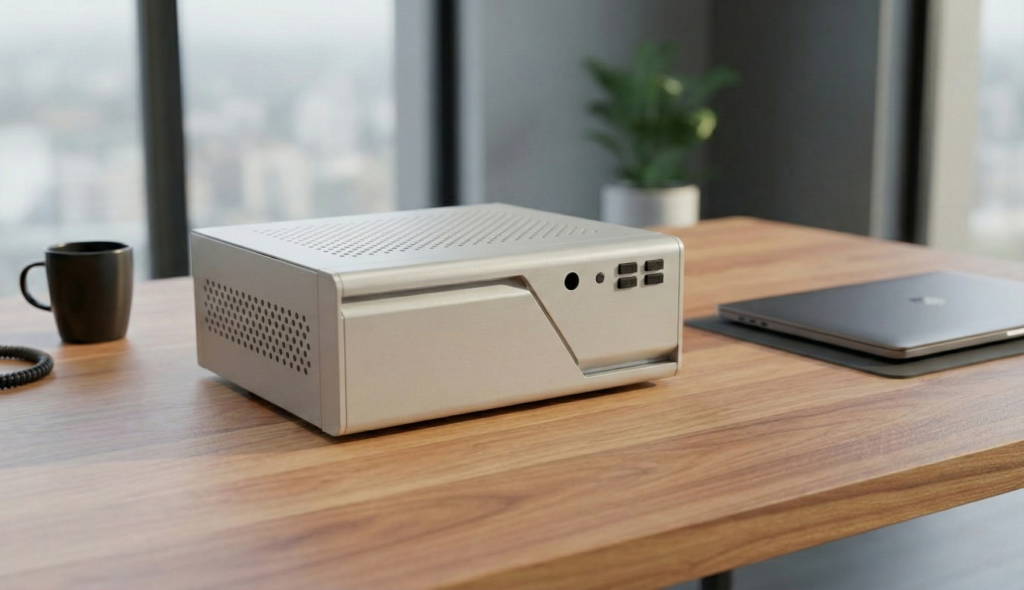
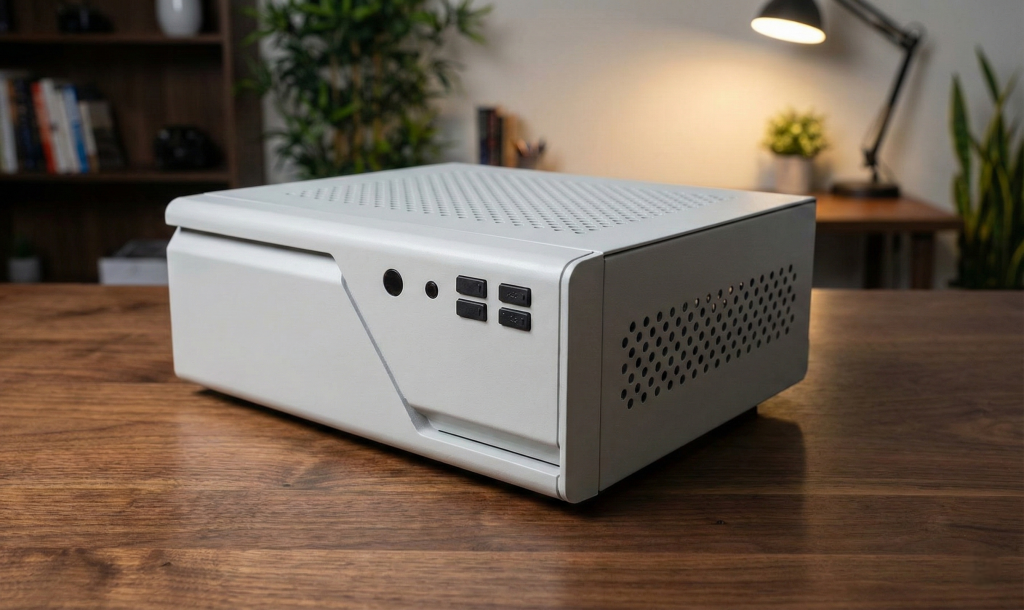
Built on an industrial-grade Intel® Skylake-U platform (EPIC-E72) with 8GB RAM and 128GB SSD. Unlike passive consumer gear, the Firegate appliance utilizes an active dual-zone cooling system (CPU + Chassis Exhaust) and high-airflow ventilation to maintain optimal thermal envelopes. This ensures sustained, non-throttled throughput even during peak traffic loads.












Deep Packet Inspection vs. Standard Firewalls
The Firegate Security Box protects your entire network by combining Suricata-powered deep-packet inspection with intelligent DNS and port filtering.
To understand how it works, imagine your internet traffic like postcodes and houses:
Ports are like postcodes – they describe the general area where data is going.
Traditional firewalls only block or allow postcodes. This is extremely limited, because many postcodes contain both good and bad houses.

DNS is like house numbers – it pinpoints the exact destination.
Firegate uses DNS filtering to recognise dangerous or suspicious “houses” and block them before the connection is even made.
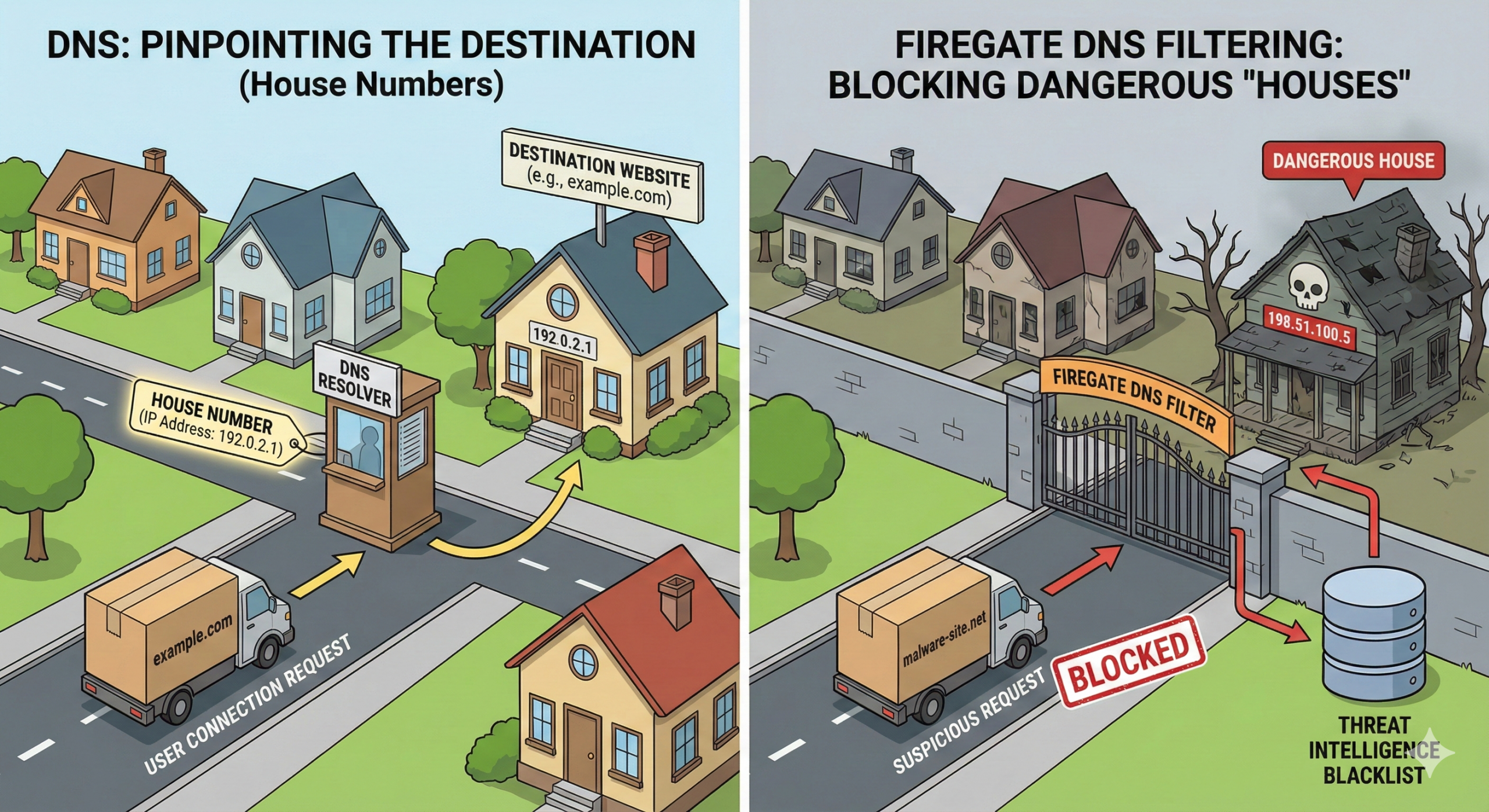
Most firewalls only block postcodes. This means they often block legitimate traffic (good houses) while allowing dangerous domains (bad houses) to slip through.
Firegate does both.
It shuts down unused, legacy ports — the equivalent of abandoned houses where only squatters live — and it also maintains up-to-date DNS blocklists to identify dangerous destinations and stop connections before they reach your devices.
Combined with Suricata’s deep-packet inspection, the Firegate Security Box:
- Detects and blocks malicious traffic in real time
- Stops dangerous domains before your device connects to them
- Prevents attacks that legacy firewalls completely miss
- Protects every device in your home or small business automatically
- Works instantly, with no configuration needed
Firegate doesn’t rely on cloud tracking, external servers, or user data collection.
It is a private, local security system built to deliver real protection without complexity.

Design and Technical Specification
Core Hardware Platform: Industrial-Grade EPIC-E72 Motherboard
Processor
Powered by an Intel® i5-6200U dual-core, quad-thread processor (2.3GHz, 15W TDP), the system provides high performance with extremely low power consumption — ideal for 24/7 security workloads.
Memory
• 1× DDR4 SO-DIMM slot
• Up to 32GB supported at 2133MHz
• Industrial-grade stability for continuous operation
Storage
• 1× SATA3 SSD (6Gbps)
• 1× mSATA slot for high-speed solid-state storage
• Optional Mini-PCIe for Wi-Fi/4G expansion
Networking
• 2× Intel® I210AT Gigabit Ethernet ports
• Hardware-level reliability, PXE support, and wake-on-LAN
• Ensures consistent throughput for IDS/IPS activities
I/O Connectivity
• 2× USB 3.0
• 1× USB 2.0
• Additional 4× internal USB 2.0 headers
• HDMI, VGA, LVDS (unused in Firegate enclosure)
Cooling & System Health
• 1× 4-pin CPU smart-fan header (PWM controlled)
• 1× 3-pin system fan header
• Full hardware monitoring: CPU temp, system temp, voltages, fan RPMs
Thermal Design & Silent Operation
Firegate uses a dual-layer cooling approach that keeps the system cool during heavy Suricata load and prevents heat-based degradation:
1. Industrial CPU Smart Cooling
The EPIC-E72 includes a BIOS-controlled smart-fan system that automatically regulates fan speed based on CPU temperature, ensuring efficiency and silent performance.
2. Additional Quiet Extraction Fan (Firegate Custom Upgrade)
You added an extra silent exhaust fan that:
✔ Pulls warm air out of the chassis
✔ Prevents heat stress during long IPS operations
✔ Reduces CPU throttling
✔ Extends long-term component lifespan
✔ Helps mitigate overheating-based denial-of-service attempts (thermal flooding)
3. Safe-to-Touch Surface
While many passive-cooled firewall appliances reach 60–75°C on the outer shell, the Firegate enclosure stays significantly cooler thanks to:
- Active airflow
- Lower-TDP industrial CPU
- Dual ventilation zones
This ensures the device remains safe to handle, even after long operational hours.
Chassis, Power & Build Quality
Enclosure
• Compact aluminum/steel hybrid design
• Optimised airflow with dust-resistant vents
• Custom I/O plate designed specifically for the Firegate system
Power System
• 12V DC input supported directly by motherboard (no conversion losses)
• Stable, low-noise power delivery ideal for continuous security monitoring
Durability
• Operating temperature range: –10°C to 60°C
• Industrial-grade components designed for long-term 24/7 uptime
• Safe from heat, dust, and vibration stresses common in consumer routers
Network Security Engine (Software Architecture)
The Firegate Security Box operates using a hybrid security model combining:
1. Firegate system based on Suricata 7 IDS/IPS Engine
- Deep Packet Inspection (DPI)
- Real-time threat detection
- Signature, anomaly, and protocol analysis
- Inline IPS mode through NFQUEUE
2. DNS-Based Threat Intelligence Filtering
- Uses global threat intelligence feeds
- Blocks malicious domains before connection happens
- Eliminates phishing, command-and-control, ransomware beacons
3. Port-Level Filtering (Postcode Model)
Your analogy works perfectly:
Ports = Postcodes
DNS = House Numbers
Firegate does what traditional firewalls cannot:
- Instead of blocking whole “postcodes” (ports) blindly…
- Firegate checks the exact house number (domain) as well.
This allows Firegate to block dangerous houses while still allowing the safe ones, even if they live in the same postcode.
Traffic Flow: How Firegate Processes Packets
Here is a clear explanation of how packets move through your system:
1. Packet Arrives From the Internet
Incoming traffic first hits the Firegate WAN port.
2. Suricata Deep Packet Inspection (DPI)
Suricata analyses:
- Protocol behaviour
- Payload contents
- Known malicious patterns
- Anomalies
- TLS fingerprints (JA3)
- Command-and-Control (C2) indicators
If packet is malicious → Dropped Immediately
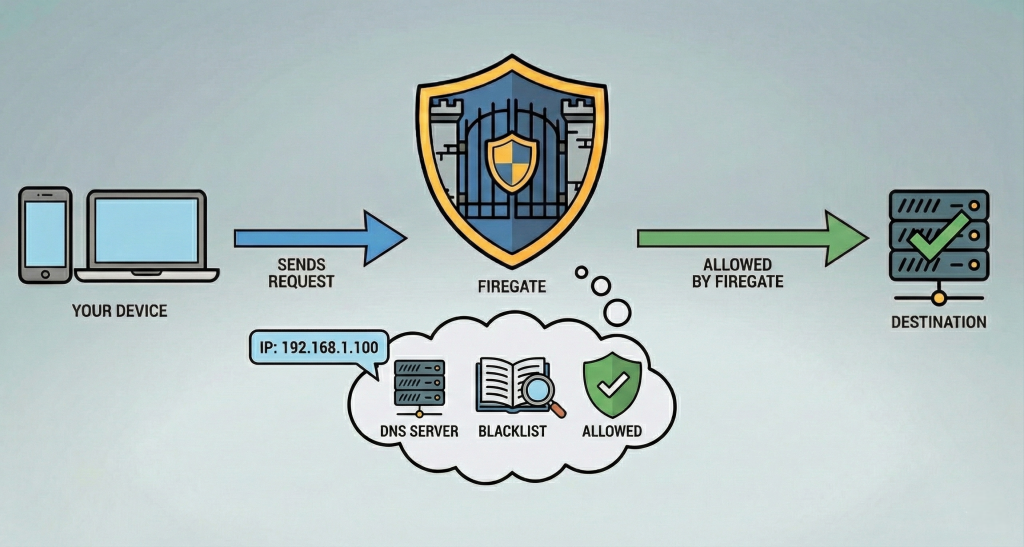
3. DNS Filtering Layer
If the user attempts to access a domain:
- DNS request is intercepted
- Compared against Firegate’s Threat Intelligence Blacklist
- If the domain is suspicious, malicious, or newly-registered → Blocked
This prevents:
- Phishing
- Malware downloads
- Cryptomining
- Botnet check-ins
- Adult/gambling/scam sites (if user enables Family Mode)
4. Clean Traffic Passes Through
If DPI and DNS checks are clean:
- Packet is forwarded to LAN
- Device receives safe, verified data
- User sees no slowdown or interruption
5. Continuous Monitoring
Firegate logs:
- Blocked DNS queries
- Suspicious flows
- High-risk behavioural patterns
These contribute to ongoing threat learning and rule updates.
Summary: What Makes Firegate Unique
✔ Industrial motherboard — not consumer router hardware
✔ Dual Intel I210 Gigabit NICs for reliable IPS performance
✔ Smart cooling + extra silent exhaust fan
✔ Safe-touch chassis, no overheating problems
✔ Suricata 7 full DPI engine
✔ Intelligent DNS threat filtering
✔ Built for homes, businesses, and public-WiFi environments
✔ Stable, silent, long-life operation
Why We Are Different
Firegate was built with a simple principle: your data belongs to you — not to us, not to the cloud, and not to any third party.
Unlike most security products, Firegate operates fully locally and never sends your personal information outside your home or business.
This approach gives you stronger privacy, stronger reliability, and stronger protection.
Fully Cloud-Independent Security
Firegate does not rely on the cloud for inspection, filtering, or analysis.
Every security action happens inside your physical box, on your network.
Cloud filtering solutions — no matter how secure — create additional risk:
✔ Your data must travel to a third-party server
✔ A cloud provider processes or stores your information
✔ If the cloud has a breach, your privacy is affected
✔ If the cloud fails, your protection fails with it
✔ Cloud services create a larger attack surface
By being cloud-independent, Firegate removes all these risks.
Your protection stays local, private, and under your control.
No Data Collection. No Telemetry. No Remote Access.
Firegate does not collect, store, or export any of your:
- browsing history
- DNS requests
- device information
- log files
- behaviour data
Everything stays on your box for a minimum of 30 days and never leaves.
We have:
- no remote access path
- no cloud dashboard
- no user monitoring
- no ability to log in to your device
Your network remains yours — always.
Cloud Outages Don’t Affect Your Protection
Cloud firewalls depend on external servers.
When those servers go down — filtering stops.
Firegate keeps running even if:
- your internet drops
- your ISP is unstable
- external services fail
- upstream DNS is unreachable
Suricata, DNS filtering, port blocking, and threat inspection all continue locally.
Only update downloading pauses — your protection never stops.
The Only Connection to Us: Secure Update Pull Every Two Weeks
Firegate uses a WireGuard-encrypted pull model:
- your box connects out
- checks for updates
- downloads them
- installs locally
- sends nothing back
No logs, no metadata, no device identifiers — nothing leaves your box.
This is a one-way update channel, not a remote management system.
Privacy-Safe Daily Health Ping
Once per day, your device sends a tiny “alive” signal to confirm it is running.
This ping contains:
- no traffic data
- no browsing information
- no IP addresses visited
- no logs
- no system details
It simply tells us the box is operational — nothing more.
Always Operational — Even Without Internet
Firegate is designed to operate independently.
If your internet goes offline:
- DPI continues
- DNS filtering (cached lists) continues
- Suricata signatures continue
- Port controls continue
- Local inspection continues
Only update fetching is delayed — security remains active.
Automatic Internet Repair Module
Every 30 seconds, Firegate checks your internet status:
- If the WAN drops
- Or if routing fails
- Or if the DNS path breaks
…it automatically begins self-repair:
✔ restarts network services
✔ rebuilds routing
✔ restores DNS
✔ recovers connectivity
Your security system recovers itself without user intervention.
In Summary — Why Firegate Stands Apart
✔ 100% local inspection — no cloud dependency
✔ Zero data collection, zero telemetry, zero log export
✔ No remote access — your device is fully private
✔ Updates are securely pulled, never pushed
✔ Protection continues even if the internet fails
✔ Industry-leading privacy with minimal external communication
✔ Automatic connection repair ensures continuous operation
Firegate gives you true security, not data harvesting, not cloud dependence, and not third-party exposure.
Your data stays in your home.
Your privacy stays in your hands.
Your protection stays uninterrupted.

Firegate VPN — Fast, Private, and Included for Free
Firegate VPN gives every customer a private, encrypted connection at no additional cost. Powered by WireGuard, it protects your online activity from tracking, ISP monitoring, public Wi-Fi risks, and location-based restrictions — all without slowing down your internet.
No logs. No tracking. No subscriptions.
Just secure, fast, privacy-first connectivity.
Global Private Nodes (QuantumSabre-Owned Servers)
Your Firegate VPN includes access to secure WireGuard servers in four European locations:
- 🇳🇱 Amsterdam, Netherlands
- 🇩🇪 Falkenstein, Germany
- 🇫🇮 Helsinki, Finland
- 🇫🇷 Paris, France
All VPN nodes:
✔ Run on dedicated hardware
✔ Are fully controlled and maintained by QuantumSabre
✔ Use no third-party VPN providers
✔ Keep zero logs
✔ Provide fast, low-latency encrypted tunnels
✔ Offer stable performance for browsing, streaming, work, and travel
Powered by WireGuard
Firegate VPN uses WireGuard, the most secure and efficient VPN protocol available today.
Benefits include:
- Next-generation encryption
- Extremely fast performance
- Low battery usage on mobile devices
- Stable connectivity
- Lightweight design — no heavy apps needed
- Instant setup with QR codes
This makes Firegate VPN ideal for laptops, mobiles, tablets, and travel use.
No Logging. No Tracking. Full Privacy.
Unlike commercial VPN services that may store metadata or share analytics, Firegate VPN:
- keeps no records of your traffic
- does not track your browsing
- does not store timestamps, IPs, or connection metadata
- does not use external cloud VPN providers
Your encryption keys stay on your device.
Your internet activity remains private.
Your data stays yours.
Included Free With Every Firegate Security Box
Every Firegate customer receives:
- Free lifetime access to Firegate VPN
- All four server locations included
- No monthly fee
- No subscription
- No data caps
- No device limit
Firegate Security Box customers get VPN access as part of the product, not as a paid add-on.
Simple QR Code Setup
VPN setup takes less than 30 seconds:
- Scan the QR code
- Import into the WireGuard app
- Connect instantly
Works on:
- iPhone / iPad
- Android
- Windows
- macOS
- Linux
- Routers (OpenWRT / pfSense / OPNsense)
Technical Highlights
- WireGuard encrypted tunnels
- Dedicated, no-log servers
- AES, ChaCha20, modern ciphers
- IPv6 capable
- Fast UDP transport
- Zero cloud dependency
- Privacy-first design
- No remote access or telemetry
Impressed by Firegate? Get your box today.
Contact us
Your security is our priority — let us know how we can help.